Kafka Queues for Quarkus
Many modern enterprise applications follow a familiar pattern with regards to messaging:
- Apache Kafka® handles high-throughput event streaming use cases.
- AMQP solutions like RabbitMQ or cloud-native options like AWS SQS or Google Pub/Sub manage standard messaging tasks.
Developers have long accepted the "infrastructure tax" of managing two different messaging platforms. This tax includes the operational overhead of managing different messaging systems, the costs associated with this infrastructure. For developers this means integrating with multiple messaging systems, sometimes in the same codebase - which makes testing more complex and can lead to client dependency conflicts.
Queues for Kafka, introduced with KIP-932, changed this. Starting with release 4.0, Kafka adds native queue semantics to the broker using a new shared consumption model. This allows for message-level acknowledgment and paves the way for multiple members of a consumer group to simultaneously process events from the same topic partition.
Quarkus is the "supersonic, subatomic" cloud-native framework for microservices on the JVM as well as natively via GraalVM. The framework provides an extensions API for integrating external systems, such as Apache Kafka. Most messaging extensions (Kafka, ActiveMQ, Redis, and others) leverage the SmallRye Reactive Messaging ecosystem - with experimental support for Queues for Kafka as of the time this was written.
Let's discuss the motivations behind KIP-932. Then we'll explore the different Kafka consumer models with Quarkus. We'll close with some observations of our consumer groups using the Kafka CLI. The examples can be found at this GitHub repo.
Why Queues for Kafka
Queues for Kafka brings traditional queue semantics to Apache Kafka by introducing the concept of share groups. Members of a share group can cooperatively consume events from the same partition. This coordination is possible because of message-level acknowledgement. In contrast, the traditional Kafka consumer model is offset-driven, behaving like a "bookmark" of the last event processed by the group.
This enables another key motivation of KIP-932, breaking the consumer parallelization ceiling. Prior to share groups, Kafka's consumer throughput is capped by the number of topic partitions, because standard consumer group coordination assigns each partition to at most one member. Adding more partitions to bypass this can bring in a new set of risks. That's a whole topic in itself, so here is a useful resource you can read later.
This diagram compares and contrasts the differences between the traditional Kafka consumer model and Queues for Kafka.
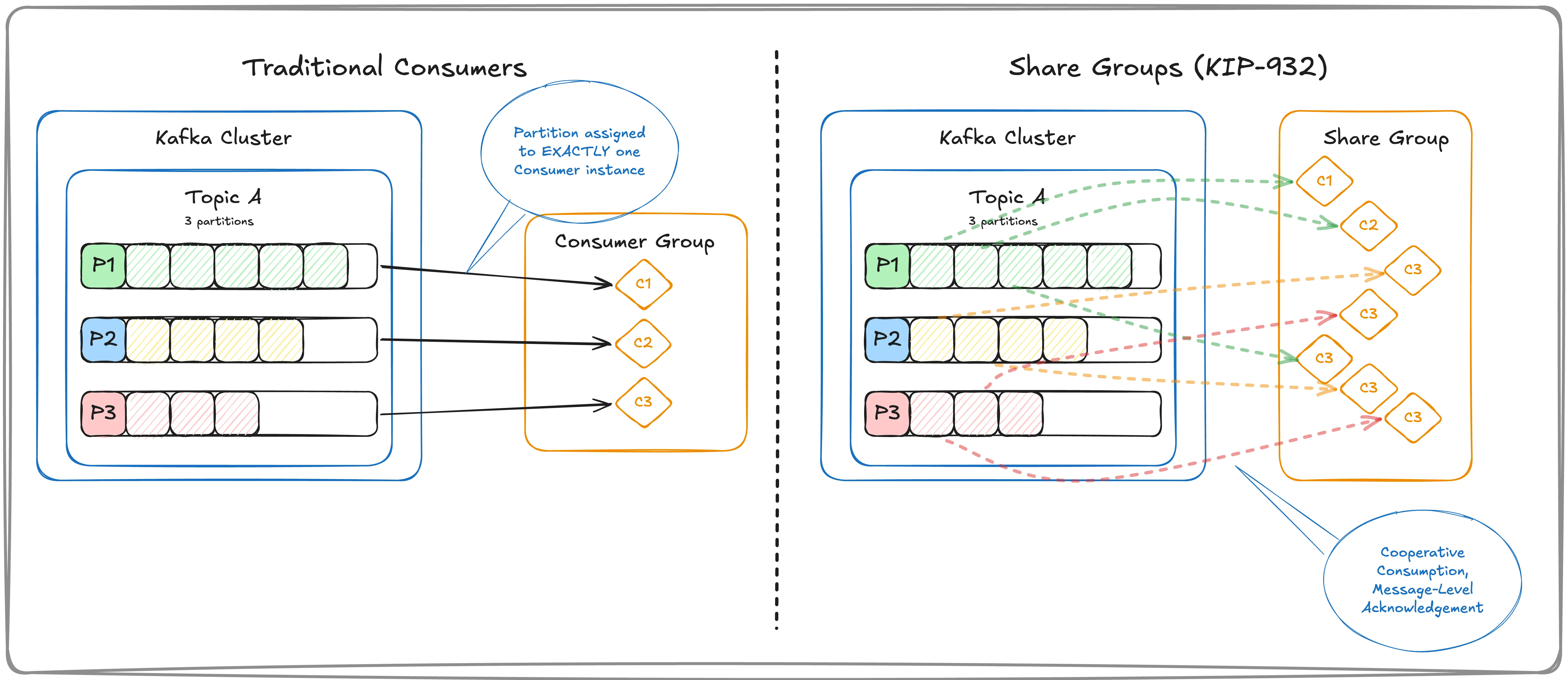
With Queues for Kafka, a consumer can fetch a small set of events and lock them from the rest of the share group. Each event is then acknowledged individually as it is processed or encounters an error. Consumers can even request more processing time from the broker as needed.
When Quarkus Met Kafka
Using an opinionated configuration, Quarkus makes it simple to get started with consuming events from Apache Kafka. Our examples use structured data via Apache Avro, with schemas managed in a schema registry.
Let's start with the traditional Kafka consumer use case via the @Incoming annotation of Quarkus. In the example below, the asConsumerGroup() method is annotated to consume events from the user-avro channel, configured in the Quarkus application config. In the SmallRye Reactive Messaging world, a channel is a named, virtual destination to pass messages between components. A channel forms a reactive stream between processing logic and a messaging system - in our case, Apache Kafka.
@Incoming("user-avro")
public void asConsumerGroup(UserProfile message) {
    log.debug("Consumer Group Consumer says: >> {}", message.getId());
    processUserProfile(message);
}
Here's what my config looks like - I prefer YAML over properties, but that's just me. Here we specify the deserializers for the events' key and value, and we override the group.id value of the consumer group - which defaults to the Quarkus application name.
mp:
  messaging:
    incoming:
      user-avro:
        auto:
          offset:
            reset: earliest
        topic: user-profile-avro
        key:
          deserializer: org.apache.kafka.common.serialization.StringDeserializer
        value:
          deserializer: io.confluent.kafka.serializers.KafkaAvroDeserializer
        group:
          id: user-avro-group
To the trained eye, you're probably wondering how Quarkus connects to Kafka. Quarkus configuration starts from a set of opinionated defaults, in large part because of the Dev Services feature of the framework. Dev Services supports autoprovisioning of unconfigured services in a "dev mode" via Testcontainers. The services to start are determined by the Quarkus extensions included in your application. Given we include the Apache Kafka extension, this starts a broker using the kafka-native container image and also a Schema Registry container - both at the hostname of "localhost" and mapped to a randomized, available port.
quarkus:
  apicurio-registry:
    devservices:
      enabled: true
Quarkus and Queues
Let's start a new consumer of the same Kafka topic, but on a separate channel. For this one, we're going to switch to the Queues for Kafka consumption model. In the Java code, not much changes. We still use the @Incoming annotation.
@Incoming("user-avro-queue")
public void asShareGroup(UserProfile message) {
    log.info("Share Group Consumer says: >> {}", message.getId());
    processUserProfile(message);
}
To the Quarkus channel, the differences in the consumption model rely on configuration. Here we configure this user-avro-queue channel as a share-group. Now the underlying consumers are of type KafkaShareConsumer.
mp:
  messaging:
    incoming:
      user-avro-queue:
        topic: user-profile-avro
        share-group: true
        key:
          deserializer: org.apache.kafka.common.serialization.StringDeserializer
        value:
          deserializer: io.confluent.kafka.serializers.KafkaAvroDeserializer
        group:
          id: user-avro-queue-group
Cooperative consumption depends on message-level acknowledgement. This is very different from the "last processed offset" tracking of the traditional Kafka consumption model for event streaming. Any events fetched by a KafkaShareConsumer are effectively locked from other members of the share group. These locks allow for other members of the share group to fetch a different set of events from the same partition.
The previous asShareGroup() method uses the default KIP-932 behavior of implicit for the share.acknowledgement.mode configuration. For fine-grained control over the lifecycle of an event, we need to change the signature of the method to accept the SmallRye ShareGroupAcknowledgement - a wrapper to the Kafka client's acknowledge mechanism - as a parameter. This allows us to react to exceptions or failed validations with different acknowledgments.
Let's create a new channel and a method for the explicit example. This additional parameter gives us access to the lifecycle of each UserProfile event.
@Incoming("user-avro-queue-explicit")
public void asShareGroupExplicit(UserProfile message, ShareGroupAcknowledgement ack) {

    if (null == message.getSecondaryEmail()) {
        log.warn("No secondary email for user {}, REJECT this message!", message.getId());
        ack.reject();
    } else {
        log.info("Emailing user {} at {}", message.getId(), message.getSecondaryEmail());
        processUserProfile(message);
        ack.accept();
    }
}
The configuration for this new user-avro-queue-explicit channel is almost identical to the previous example. The one wrinkle we've added is the concurrency setting. This starts 3 instances of the channel - with the subsequent KafkaShareConsumers - for this instance of the Quarkus application. Our user-profile-avro topic has only 1 partition. By using this concurrency value those consumers will cooperate to process events from that single partition.
mp:
  messaging:
    incoming:
      user-avro-queue-explicit:
        topic: user-profile-avro
        share-group: true
        concurrency: 3
        key:
          deserializer: org.apache.kafka.common.serialization.StringDeserializer
        value:
          deserializer: io.confluent.kafka.serializers.KafkaAvroDeserializer
        group:
          id: user-avro-queue-explicit-group
Peeking Behind the Curtain
We can use the Kafka CLI tools to gain some insight into the share groups created from our Quarkus application. You'll need to find the port on which the Kafka broker is listening. The broker is a test container started by Quarkus DevServices, which will use a randomized port number that changes each time you restart the Quarkus app. In my case here, it's mapped to 58353.
Let's assume you have an Apache Kafka distribution at your disposal. This includes a set of useful CLI tools we can use to interrogate consumer groups and share groups. In this case, I'm using version 4.3.1 - which you can download here.
First, let's take a look at the share groups known by our cluster:
❯ ./bin/kafka-share-groups.sh --bootstrap-server localhost:58383 --list
user-avro-queue-explicit-group
user-avro-queue-group
The CLI will also allow us to describe a share group, seeing the partition assignments, share partition start offset (SPSO), and lag of the group.
❯ ./bin/kafka-share-groups.sh --bootstrap-server localhost:58383 --describe --group user-avro-queue-group

GROUP                 TOPIC             PARTITION  START-OFFSET  LAG
user-avro-queue-group user-profile-avro 0          259           0
Remember the explicit group started 3 instances of KafkaShareConsumer. We can use the CLI to describe each member, specifically the partition assignment.
❯ ./bin/kafka-share-groups.sh --bootstrap-server localhost:58383 --describe --group user-avro-queue-explicit-group --members

GROUP                          CONSUMER-ID            HOST            CLIENT-ID                                       #PARTITIONS  ASSIGNMENT
user-avro-queue-explicit-group 0YxrRiS8Q8OprKJgWxvYNQ /192.168.65.1   kafka-share-consumer-user-avro-queue-explicit$1 1            user-profile-avro:0
user-avro-queue-explicit-group LUEnLsCmQbmlt1CBIOfeiA /192.168.65.1   kafka-share-consumer-user-avro-queue-explicit$2 1            user-profile-avro:0
user-avro-queue-explicit-group XyR8W6HxR9afQwbOH7iBVA /192.168.65.1   kafka-share-consumer-user-avro-queue-explicit$3 1            user-profile-avro:0
To Put a Bow on It
I've found integrating a Quarkus application with Apache Kafka to be a largely friction-free exercise. As with any framework, there are fine-grained details that go beyond the scope of a piece like this. To learn about Quarkus check out the Quarkus Getting Started guide, and read more on integrating data streaming to your Quarkus app using the Apache Kafka Connector extension.
Quarkus is also an excellent option for Kafka Streams applications. The Dev UI provides visualizations for your topologies. And you reap the "developer joy" benefits of live reload, opinionated configuration, and others - sounds like I've found a topic for an upcoming blog.
The sample code can be found on my GitHub, including how to provision and connect the examples to Confluent Cloud.
For more on Queues for Kafka, check out Jonathan Lacefield's piece on the Confluent blog, my article in InfoWorld, and watch my lightboard video.
If "a picture is worth a thousand words" to you, try my Share Group Visualizer - a tool to simulate the cooperative consumption model. You can see how partitions and consumer instances affect the lifecycle of events in KIP-932.