Absolutely Everything You Always Wanted to Know About Watermarks in Apache Flink - Part 1: Apache Flink
Watermarks are probably the most discussed aspect of Apache Flink®, often one of the most difficult to get your head around. There are many excellent introductions to the concept, like David Anderson's videos on Confluent Developer or the interactive Flink Watermarks WTF, but no exhaustive reference.
In my job at Confluent I often find myself looking for details and nuances. For watermarks, it's always asking around, confirming my understanding, and putting together the pieces of the puzzle. AI helps, but only so far; it's the very same lack of exhaustive, in-depth content that annoys me as a human which often makes AI hallucinate.
In this two-part post, I am collecting what I learned about watermarks. Part 1 (this one) is dedicated to Apache Flink, in general. Part 2 focuses on the different behaviors and extensions introduced by Confluent Cloud for Apache Flink. The goal is to provide an in-depth explanation of watermarks, but also a reference you can consult in random access mode. These are interleaved with gotchas and warnings, when ambiguous or confusing concepts are encountered.
This deep-dive assumes an understanding of Apache Flink concepts. You can refer to the Apache Flink Glossary as reference for many of these terms. Note that there are some terms in Flink that are used inconsistently in the documentation and other writing, and when I discuss these later in the article I'll flag any such ambiguities.
If you are completely new to stream processing and Apache Flink check out the excellent learning material available on Confluent Developer.
A quick note about the scope of the article: to keep this article as clear as possible and so I could publish it in my lifetime ;) I'm looking at Flink SQL and Table API only. Watermarks internals apply to all Flink APIs, but I will skip anything specific to DataStream API. I'm also including in scope only sources reading from Apache Kafka®.
Contents
- What are Watermarks
- Watermark Generation
- Watermark Propagation
- Idle Partition Detection
- Watermark Alignment
- Watermarks vs Checkpoints
- Watermarks and Lateness are Non-Deterministic
- Batch Mode
- Conclusion
What are Watermarks
In this deep-dive into Watermarks I will not cover the basics, like event-time vs processing-time or what problem Watermarks solve, assuming some familiarity with these ideas. If you are not familiar with these concepts, I recommend checking out, in order, the already mentioned Flink Watermarks WTF, the Event Time and Watermarks video from Confluent Developer, and Notions of Time: Event Time and Processing Time from the Apache Flink documentation.
Let's build on top of these foundations and see how Watermarks are represented inside Flink.
Watermarks are signals periodically injected by Flink into the flow of records, and they flow with data along the Dataflow.
Each Watermark associates with a timestamp, expressed in milliseconds after epoch.
Don't let this confuse you: the term "Watermark" is also ambiguous in Flink. It refers to both the time (timestamp) used by an Operator for time-based logic, and the signals sent through the dataflow to propagate these timestamps across the dataflow.
Even if a statement does not use any time-based operations, if defined, Watermarks are still active and may affect the processing of records. For example, Watermark Alignment may affect the speed at which different partitions are consumed, regardless of whether the other operators make use of Watermarks or not.
The following sequence of diagrams shows Watermarks across the Physical Graph of a Flink Job. For now, I am going to omit the details about how they are generated and how exactly they propagate downstream. We will cover all the details later.
Note that a Watermark's time is represented as milliseconds from the Epoch. Showing 1787318792435, 1787318916918, 1787318924034... in the diagrams would not be practical, so we will use small numbers instead.
-
Each Subtask keeps track of its own Watermark time, independently.
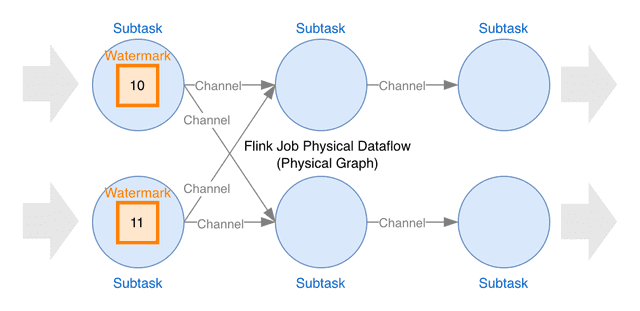
-
Watermark signals flow downstream, through Channels, from one Subtask to the next one, determining the Watermark time of the next Subtask.
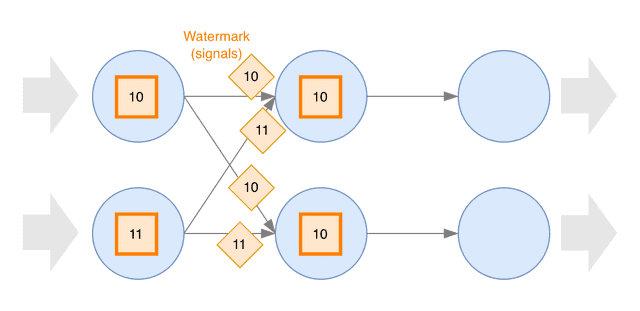
-
In turn, each Subtask emits Watermark signals downstream, until they propagate across the entire Dataflow and reach the Sinks.
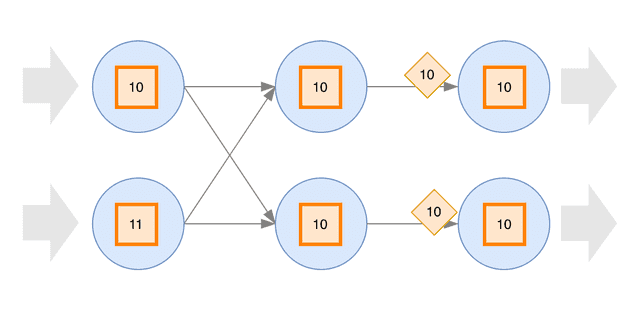
What are Watermarks Used for
Watermarks are used by time-based operators, such as time windows or temporal joins, to determine when to trigger some operations.
For example, a time window ending at time T is closed (i.e. calculations are triggered, result is emitted, and window state is dropped) when a Watermark with time >= T is observed by the Operator doing the window aggregation.
More precisely, Watermarks are generated, propagated, and used at the Subtask level.
For simplicity, we may talk about Operators, even though the process happens for each Subtask independently.
What are Watermarks NOT Used for
Operations which are NOT based on time (e.g. simple JOIN, UNION ALL, filtering by WHERE conditions) do not use Watermarks.
Watermarks are also not used to clear the state based on state TTL, which is always based on the wall-clock (system time).
Watermarks are also not used in batch mode/snapshot queries.
Watermark (time) at the Operator
Each Subtask determines its Watermark time based on the minimum (oldest) time across all its active (non-idle) inputs. For a Source Subtask, the time of each input is the MAX (newest) event-time observed in that Kafka partition; for any other Subtask, it is the Watermark received on that input Channel.
This is usually called Watermark at the Operator, even though every Subtask (every instance of an Operator) has its own Watermark time. A Subtask uses this time for time-based logic.
Late Events
Any event with event-time older than or equal to the Watermark at the Operator is considered a late event.
Late events are (silently) dropped by most time-based operations, such as window aggregations. Some time-based operators, such as Interval Joins, handle late events differently.
Late events are dropped only if you have time-based operations, or, in general, operators ordering by the time attribute, such as MATCH_RECOGNIZE. There is no such thing as late events in operations not based on time.
What Happens when Watermarks get "Stuck"
In some situations, the Watermark time may not progress. This causes time-based operations to stop progressing: for example, windows never close, and results are not emitted. Data appears to be "stuck".
This may happen at any point of the dataflow, in a single Subtask or in all Subtasks of a specific operator. When Watermarks get stuck at some point, they also stop progressing downstream.
If a statement does not contain any time-based logic, stuck watermarks have no practical effect.
Watermark Generation
Watermarks are always generated by the Source Subtasks and propagated downstream. Downstream Subtasks use the Watermarks received from upstream to generate and emit their own Watermarks.
Watermarks are generated based on a specific event-time (aka Time Attribute), which is a time attribute written in each record.
A Source Subtask generates Watermarks for each Kafka partition read by the Subtask (for each Source Split to be more generic). The Watermark of a Kafka partition is the MAX (newest) event-time observed in that partition, minus the Watermark Delay Interval, minus 1 millisecond.
Then, the Source Subtask merges the Watermarks of the Kafka partitions using the same logic used for Watermark Propagation as we will see shortly: the MIN (oldest) Watermark across all read (Kafka) partitions, ignoring Idle Kafka partitions.
Don't let this confuse you:
- Watermarks are generated at the sources based on the MAX (newest) observed event-time (minus an interval, minus 1 millisecond).
- Watermarks at Subtasks are based on the MIN (oldest) received Watermark time. This is what is propagated downstream.
Note that in each partition Watermarks are always monotonically increasing: the time of the next Watermark is always greater than (newer) the time of the previous Watermark. No Watermark is emitted when it does not progress.
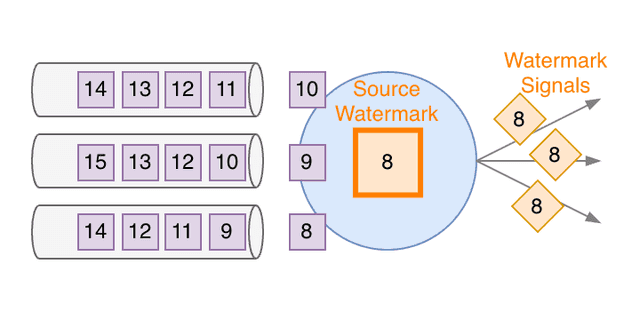
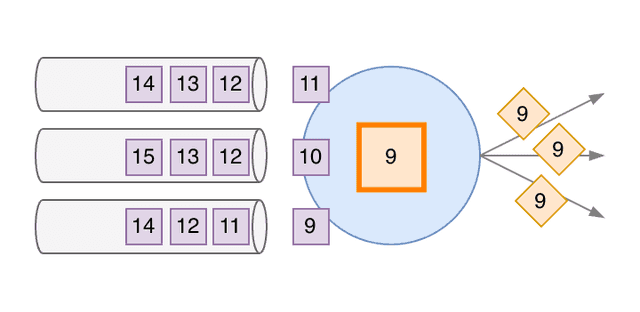
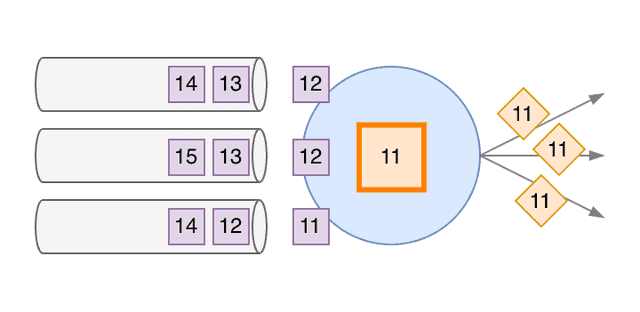
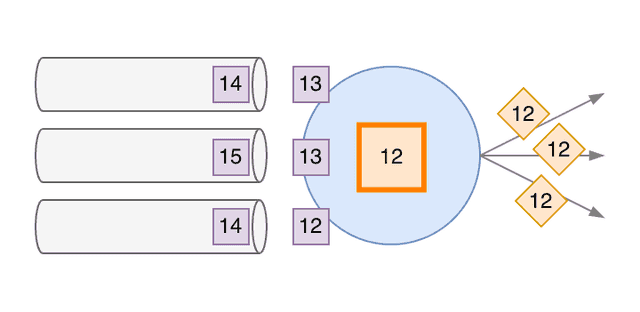
For simplicity, the diagram shows timestamps as two-digit numbers, even though they are in reality milliseconds since the Epoch, and pretends that the Watermark Delay Interval is zero. We also show the Watermark of the partition as identical to the timestamp, when it's actually the timestamp minus 1 millisecond (see Watermark Generation).
-
Each Source Subtask can consume multiple Kafka partitions. The purple squares represent the records in each partition. The number is the time attribute of each record.
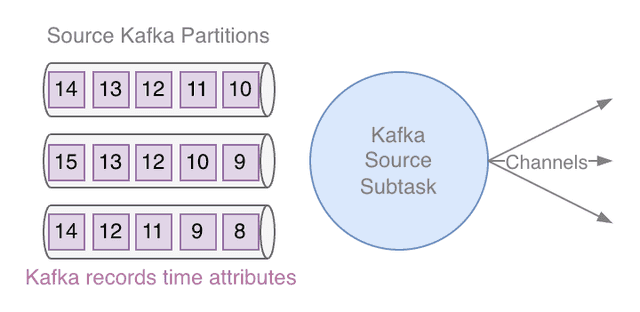
-
The Source Subtask consumes messages from the partitions. It keeps track of the maximum time received on each partition (this can be seen as the "Watermark time of the partition"). For simplicity, let's pretend that Watermark Delay Interval is zero and the partition's Watermark is exactly the max timestamp. The Source Subtask Watermark time is the minimum of all partitions' Watermarks. When its Watermark progresses, the Subtask emits downstream Watermark signals.
-
As the Source keeps consuming records from all partitions, its Watermark time progresses as the MIN of all the MAX time observed on each partition. Again, when the Subtask Watermark time progresses, from 8 to 9, it emits Watermark signals downstream.
-
The Watermark time is monotonically increasing, due to the "minimum of all maximum" logic. It is not continuous though. It can make jumps, like from 9 to 11, depending on how records are consumed from the partitions.
-
Each time the Watermark time progresses, the Subtask emits new Watermark (signals) to all downstream Channels.
Watermark Delay (Bounded Out-of-orderness)
To take into account out-of-order events, Watermarks are normally delayed compared to the maximum observed event-time. An interval is subtracted (timestamp moved back in time) from the latest observed event-time. This is very explicit when we define watermarks in SQL. For example:
CREATE TABLE ...
    WATERMARK FOR event_time AS event_time - INTERVAL '30' SECOND
This delay allows records which are slightly delayed to not be considered late events and silently dropped by time-based operations.
Don't let this confuse you: Watermark Emission Interval and Watermark Delay Interval are different things.
Watermark Delay also delays the time when time-based operators are triggered. Longer Watermark Delay implies higher output latency.
Attention: Watermark Delay does not guarantee that no late event is ever encountered and dropped. The Watermark Delay is normally chosen so that events are usually not late. These watermarks are called heuristic watermarks (as opposed to perfect watermarks, which would guarantee no late event ever) because they are statistically good, but do not guarantee the absence of late events.
Watermark Emission
Watermarks are normally emitted at fixed intervals by all Source Subtasks. The default emission interval is 200 milliseconds (as of Flink 2.3).
Watermarks are only emitted if the Watermark time of the Source Subtask progresses. If, at the end of an interval, Watermark time has not progressed, no Watermark signal is emitted.
You can customize the Watermark emission interval by setting pipeline.auto-watermark-interval:
SET 'pipeline.auto-watermark-interval' = '100 ms';Completely idle sources (no record at all): If a Source Subtask never receives any record from the Kafka partitions it consumes, no Watermark is ever emitted (in SQL, Watermarks are NULL).
At some point, if enabled, Idle Partition Detection will kick in, and start ignoring these partitions, for the sake of Watermark Emission.
Watermark Definition
In Flink SQL you can define your watermarks specifying:
- The Time Attribute (event-time) used to generate Watermarks. You can use any field present in the record with type TIMESTAMP_LTZ(p) or TIMESTAMP(p). This is usually a field representing when the event "has happened", and it is normally created by the system which generated the event.
- The Watermark Delay Interval (out-of-orderness tolerance).
CREATE TABLE ...
    WATERMARK FOR <time-attribute> AS <time-attribute> - INTERVAL '<time>' <time-unit>
The Watermark Delay interval is normally defined but optional, as we will see in Strictly Ascending Watermarks.
Time Attribute Type
- TIMESTAMP_LTZ(3) is the recommended type for the time attribute.
- TIMESTAMP(p) fields are supported but discouraged because they make the TZ implicit. Precision p below 3 is supported but discouraged because it reduces time granularity to coarser than milliseconds.
If the chosen field is not a supported type for time-attribute (TIMESTAMP_LTZ(p) or TIMESTAMP(p) with 0 <= p <= 3), you need to define a calculated field converting the original field to a supported type, ideally TIMESTAMP_LTZ(3):
CREATE TABLE ...
    raw_ts_ms BIGINT, -- original timestamp field, not time-attribute compatible
    event_time AS TO_TIMESTAMP_LTZ(raw_ts_ms, 3), -- calculated field, converted to TIMESTAMP_LTZ(3)
    WATERMARK FOR event_time AS event_time - INTERVAL '5' SECOND
Types of Watermarks
Depending on the use case, you may choose different "types" of Watermarks, with different Delays.
Bounded out-of-orderness Watermarks
This is the most commonly used type of Watermarks we have already seen. The Watermark Delay is a non-negligible interval, usually seconds or more.
CREATE TABLE ...
    WATERMARK FOR event_time AS event_time - INTERVAL '30' SECOND
(Slightly) late events may "slip through"
There is a corner case which is good to be aware of, even though it's rarely an issue for correctness.
Rarely, events whose timestamp is out of order by more than the Watermark Delay interval may still "slip through" and not be considered "Late" (not being dropped). How can this happen?
- For Flink, an Event is Late (and dropped) only if its event-time is older than or equal to the last emitted Watermark: event_time ≤ last_emitted_watermark_time
- Watermarks are emitted every short interval in wall-clock (200 ms by default), not on every single event.
- A record which has event_time ≲ MAX(event_time) - watermark_delay (theoretically "late"), but happens to be before the next Watermark signal emission, is not considered Late (not dropped).
This behavior is more likely to happen when Flink is reprocessing historical data than when processing live data and is one of the potential reasons for non-determinism when replaying the same dataset multiple times.
This problem can be mitigated using a Punctuated Watermark Strategy emitting Watermarks after every single event. This can be achieved setting scan.watermark.emit.strategy = 'on-event'. However, the performance overhead of this remedy can be significant.
Ascending, and Strictly Ascending Watermarks
There are use cases which are extremely sensitive to latency and do not care about dropping some out-of-order events.
In these cases, we do not want to add any bounded-out-of-orderness. The drawback is, obviously, that we may drop events even if they are only minimally out-of-order.
Remembering that Late Events are those which event_time ≤ watermark_time (note the "equal"), we can define two slightly different types of (very strict) Watermarks:
- Strictly Ascending Watermarks: no Watermark Delay interval
- Ascending Watermarks: Watermark Delay interval of 1 millisecond (the minimum possible)
CREATE TABLE ...
-- Strictly Ascending Watermark
WATERMARK FOR event_time AS event_time
CREATE TABLE ...
-- Ascending Watermark
WATERMARK FOR event_time AS event_time - INTERVAL '0.001' SECONDAgain, both are suited for extremely latency-sensitive use cases. Choosing one or the other depends whether you expect multiple records with the same identical timestamp or not. This depends on what happens upstream and how records are generated.
Imagine your events are generated upstream by some batchy process. This process assigns the same timestamp to all events generated in a batch. With Strictly Ascending Watermarks all of the events of a batch, after the first one, would be considered Late and dropped. (Non-strictly) Ascending Watermarks prevent this.
For anything else, these two types of Watermarks are substantially identical.
Choosing the Watermark Delay
The choice of the Watermark Delay is a critical one.
- Too short Watermark Delay: chances of events being late (after the watermark) increase. Late Events are discarded by default. This may cause data loss. You may have a problem with completeness and correctness.
- Too long Watermark Delay: the latency of the output of any time-based operation is increased by the delay and may be excessive, and there is still no guarantee that Late Events will not happen.
The right delay depends on how out-of-order the events can be, in relation to their event-time. This usually depends on what the event-time attribute represents, how it is generated, and potential delays in the system upstream of the Kafka topic Flink is reading from.
A Statistical Approach to Heuristic Watermarks
Unless some business rule tells you explicitly "how late an event can be" or "what's the latest event you care about", you can adopt a statistical approach.
Purely as an example:
- Analyze the data in your source system (Kafka topic) over a reasonable amount of time.
- Calculate the distribution of the difference between Kafka ingestion time and your event-time attribute. Kafka ingestion time is often ~ Kafka record timestamp, unless you overwrite the timestamp explicitly in the producer.
- Pick a reasonably high percentile (e.g. p99.5) as your Watermark Delay.
- If this is too high as output latency, check where your latency SLA sits in the actual distribution (and probably discuss with the business stakeholders).
Note that a meaningful distribution usually requires a long observation window that can go beyond your topic retention. This kind of analysis is normally done with a continuous measurement or analyzing data offloaded to storage at-rest, rather than a one-off query over the topic.
SOURCE_WATERMARK() Function
The SOURCE_WATERMARK() built-in SQL function delegates the Watermark generation to the Source Operator. It can be used in the Watermark definition, like WATERMARK FOR event_time AS SOURCE_WATERMARK().
However, there is an important caveat: as of Flink 2.3, among ASF-maintained connectors only the Kafka Source Connector supports source Watermark generation.
Watermark Propagation
Watermarks are generated by the Source Subtasks, based on the Kafka partitions, and propagate downstream along the dataflow, through all other Subtasks.
Again, we refer to Kafka sources to simplify the explanation, but the concepts apply to any source.
Source Subtasks
Putting together what we have already seen, a Source Subtask:
- Calculates a Watermark time for each Kafka partition as MAX (newest) event-time attribute observed on the partition since the Job started.
- Determines its own Watermark time (i.e. the Watermark time at the Operator) as MIN (oldest) Watermark time across all active (non-idle) Kafka partitions read by the Subtask.
- Periodically emits Watermark signals to all output Channels.
What about non-Kafka sources? The new Flink Source API, as specified by FLIP-27, defines the generic concept of Split. A Split is a different thing, depending on the system the Source is reading. For Kafka, Split = Kafka partition. The mechanism described works the same way for all modern Flink Sources, reading the event-time attribute per Split.
Other Subtasks
Any downstream, non-Source Subtask generates its Watermark time based on the Watermarks received from all their active (non-idle) input Channels.
A non-Source Subtask:
- Calculates its own Watermark time as MIN (oldest) Watermark time received across all active (non-idle) input Channels, since the Job started.
- When its Watermark time increases, emits a Watermark signal to all output Channels.
-
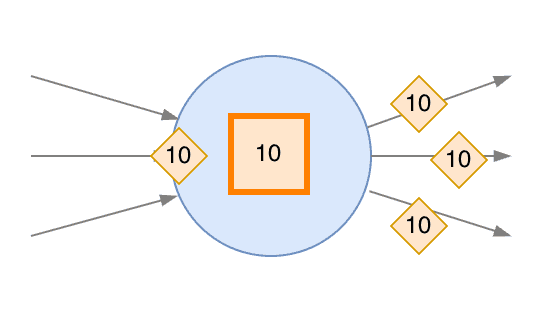
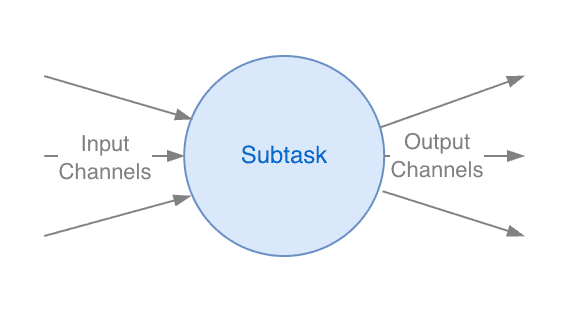
A (non-Source) Subtask can have multiple input Channels and multiple output Channels.
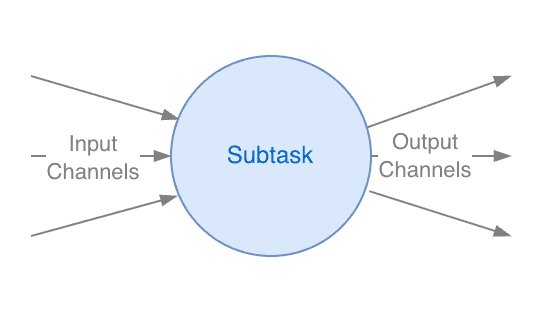
-
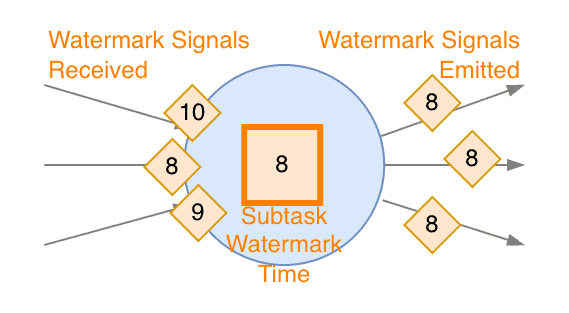
The Subtask Watermark time is the minimum Watermark signal received across all active input Channels. When the Watermark time progresses, the Subtask emits Watermark signals to all its output Channels.
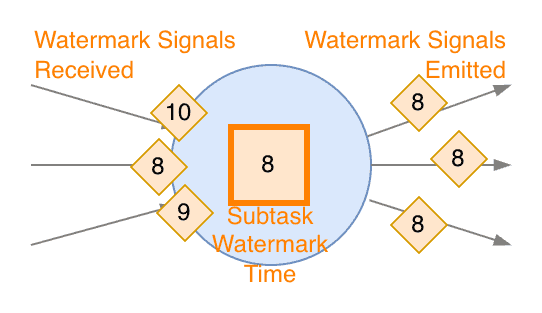
-
Even if Watermark time received on a single Channel progresses further...
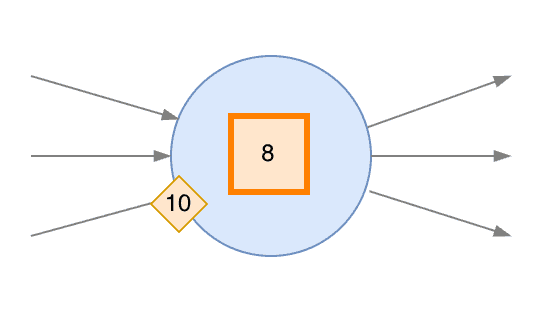
-
...the Subtask Watermark only progresses to the minimum time received across all active input Channels.
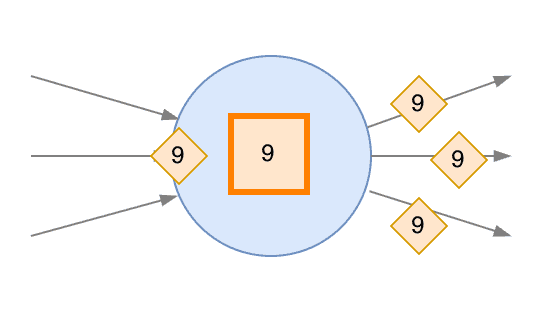
-
Every time the Subtask Watermark progresses Watermark signals are emitted downstream.
<pedantic-mode>
Flink terminology: "Channel"
I did mention the ambiguity of terminology you often find in Flink content in general. "Partition" is an example. Public documentation uses "partitions" when discussing Watermarks, meaning both "Kafka partitions" at the Source Connector, and "internal partitions" of the Physical Graph. Maybe it's just me, but this ambiguous term confuses me, a lot.
Because we are focusing on Kafka Source, I am using the term "Kafka partitions" for those, and the term Channel for the connections between Subtasks within the Physical Graph. A Subtask's Input Channels are the "internal partitions" received from upstream Subtasks. Output Channels are the "internal partitions" sent to downstream Subtasks.
The term "Channel" appears in Flink internals and FLIPs but rarely in public documentation.
</pedantic-mode>
We can now continue...
For the moment, we have omitted the mechanism to decide when a partition or Channel is active or idle. We will cover Idle partition detection, below.
My mental model
- Watermarks are calculated and propagated per Subtask.
- A Subtask's Watermark time advances with the MIN (oldest) "upstream time" received.
- For Sources, "upstream time" is the event-time attribute in the Kafka partitions.
- For other Subtasks, "upstream time" is based on the Watermark signals received on input Channels.
- Idle (non-active) "partitions" are ignored for Watermarks.
- For Sources, "partitions" are the Kafka partitions.
- For other Subtasks, "partitions" are the input Channels (think of them as "internal partitions").
SQL Operators Propagating Watermarks in Special Ways
Some SQL operators, due to their logic, propagate Watermarks in special ways or they do not propagate them at all.
SQL Operators Not Propagating Watermarks
Some operators "drop" the Watermark for practical use.
What happens in reality is that the operator removes the metadata marker identifying the event-time attribute (rowtime attribute), rendering the Watermarks unusable downstream. Technically, Watermarks are still emitted and propagated, but the link with the time attribute is severed. A downstream Operator receives the Watermark signals but doesn't know which attribute to compare it with.
Here downstream means, "Operators coming after it, in the Dataflow Directed Acyclic Graph (DAG)". When you write SQL, the Dataflow is decided by the Table Planner when you submit the Statement. If you try using event-time in an Operator which ends up downstream of one of the Operators dropping the metadata marker, you get an error.
SQL operators dropping the rowtime attribute, making the Watermark unusable downstream:
- Regular JOINs - both INNER and OUTER equi-JOIN.
- Window TVF aggregations, unless you include window_time in the GROUP BY. If you do group by window_time, this is propagated as time attribute. window_time is always window_end - 1 ms. window_start and window_end cannot be propagated.
- Top-N Queries (Ranking) - Queries using ROW_NUMBER() and filtering by the top-N results.
- MATCH_RECOGNIZE, unless you include MATCH_ROWTIME() in the output.
- Global Distinct - DISTINCT across the entire history.
- Set operations - UNION, INTERSECT, EXCEPT.
Note that UNION ALL is not part of the list. It simply merges two streams and propagates Watermarks with the normal rule of oldest Watermark between the two merged streams.
My mental model: An Operator drops the rowtime attribute if its logic cannot guarantee that emitted records respect advancing Watermarks. This occurs when it may emit records older than emitted Watermarks, even if they were not late when received by the operator. For example, a regular JOIN can hold a record in state until the TTL expires and emit the result only when a matching record arrives, which may be much later.
Workaround
If you need to use time-based operation downstream of Operators that drop Watermarks:
- Emit the result to Kafka;
- Read it back with a different statement.
Process Table Function (PTF)
As of Flink 2.3, a Process Table Function (PTF) can still access the current Watermark time through ctx.timeContext(Long.class).currentWatermark(), regardless of whether the event-time attribute was suppressed. However, the Watermark time may or may not advance, depending on what sits upstream in the Dataflow.
Also, if the time attribute marker is suppressed, event-time Timers in PTF will not trigger.
SQL Operators Delaying Watermarks
Certain operators may add significant delay to Watermarks, downstream:
- Interval Joins
- MATCH_RECOGNIZE
Delay Introduced Downstream
These operators delay the Watermark downstream by the maximum interval the event-time of matching records may differ. For example, an interval join with condition A BETWEEN B - INTERVAL '10' MINUTE AND B + INTERVAL '5' MINUTE will delay the watermark by 10 minutes, because it may match A records which are up to 10 min older than B records.
The Watermark delay of an Interval Join is equal to the MAX between the lower bound and upper bound intervals. Note that the delay is not the sum of lower bound interval and upper bound interval, as a first intuition would suggest.
If you're curious, check out the source code of interval join operator.
Similarly, a MATCH_RECOGNIZE with a clause WITHIN INTERVAL '5' MINUTE will delay watermarks by 5 min.
Rationale
These operators introduce potential out-of-orderness in the stream, because they may wait for potential matches that are up to an interval apart in terms of event-time.
If the operator did not withhold the Watermark, matched records may become late for downstream time-based operators.
Note that we are not talking about late events or slow partitions here. All input streams may be perfectly up to date, but one record may still match with another record which is a long interval older.
Also, this delay happens even if all records match immediately. Flink "plays safe" and systematically delays the Watermark of the maximum possible out-of-orderness.
Temporal Joins Time Attribute
A Temporal Join handles the two inputs in different ways:
- Left-side ("Probe" side, or the "events") - stream of append-only events, to be enriched.
- Right-side ("Build", or the "enrichment dimension") - enrichment data.
It does propagate Watermarks following the normal rule of the MIN (oldest) Watermark from all active inputs. However, the event-time attribute is solely based on the left-side (probe/event side).
Idle Partition Detection
Idle Partition Detection at the Source
We have seen how a Source Subtask calculates its Watermark time as the MIN (oldest) across all input (Kafka) partitions, where each partition's Watermark is based on the MAX (newest) event-time observed in it. Thus, if a single Kafka partition receives no records, the Source Subtask's Watermarks cannot advance.
-
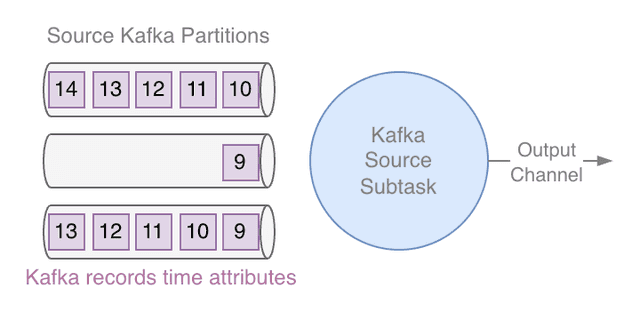
Let's consider a Subtask of a Kafka Source which is consuming three partitions, at the moment all receiving records.
-
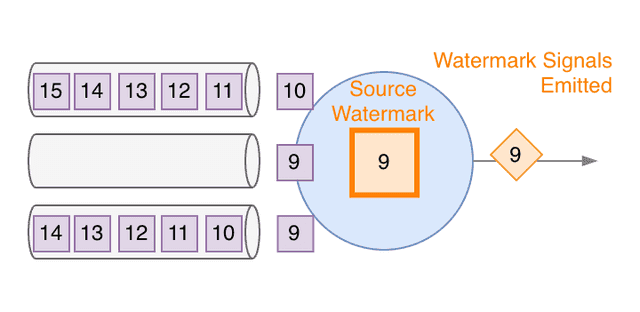
As we have seen, the Source Subtask Watermark time is the MIN (oldest) across all partitions of the MAX event-time received on each partition (the "Watermark of the partition"). As long as event-time progresses on all partitions, the Subtask Watermark progresses and it emits Watermark signals downstream.
-
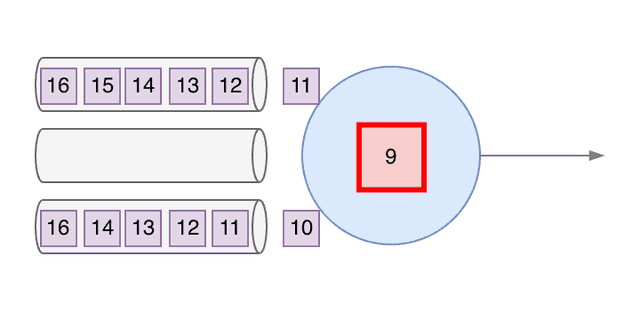
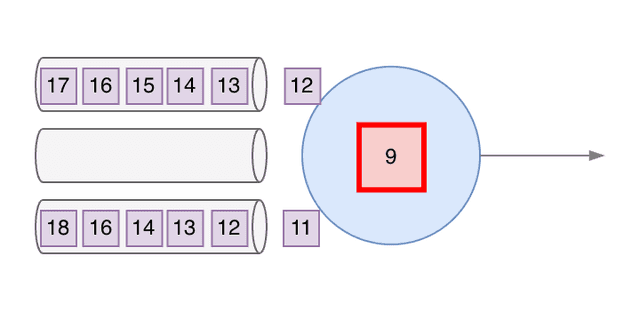
However, if one of the partitions stops receiving records the Watermark time of the Subtask cannot progress, being the MIN across all partitions. The Subtask Watermark time gets "stuck"...
-
...and no Watermark signal is emitted downstream...
-
...regardless of whether other partitions keep receiving newer records.
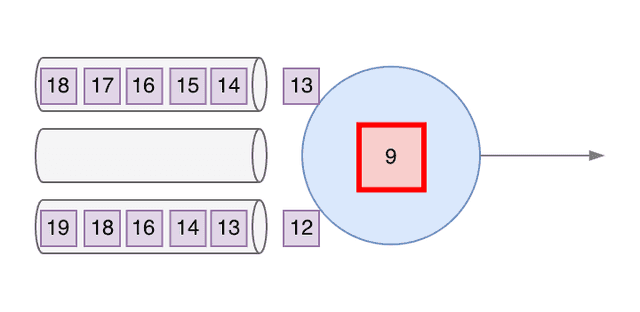
To prevent Watermark time getting "stuck" because of idle Kafka partitions, the Source connector may support Idle Partition Detection: if no record is received after a timeout, the Source marks an input Kafka partition as Idle.
Any partition considered Idle is ignored for the purpose of generating Watermarks: Watermarks are generated based on all active (non-idle) partitions.
An Idle partition gets back to Active as soon as a record is received. From that point on it contributes again to the Watermark calculation (and the timeout count is restarted).
-
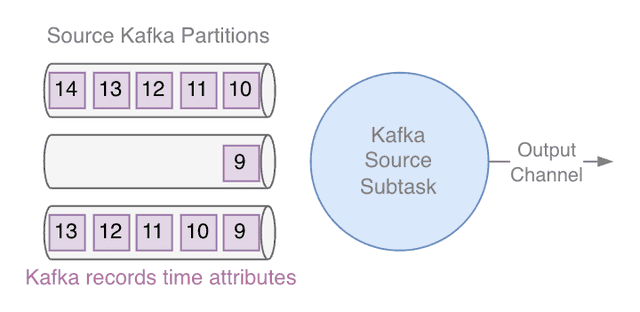
Let's get back to the previous example of a Kafka Source Subtask consuming multiple partitions.
-
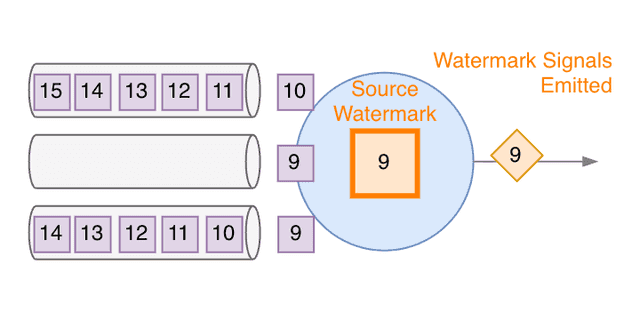
As long as the time progresses on all partitions, the Subtask Watermark time progresses and Watermark signals are emitted downstream.
-
If one partition stops receiving messages, the Subtask Watermark stops.
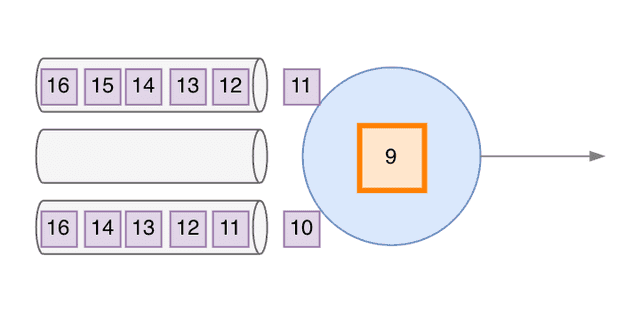
-
However, this time Idle Partition Detection is enabled. The timer starts after the last record was received on the partition. The Subtask Watermark time is still "stuck", even if other partitions keep receiving records.
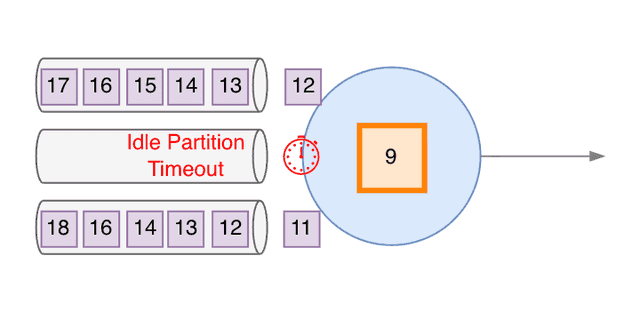
-
When the timeout expires, the partition is marked as Idle and, from now on, ignored for the sake of Watermark calculation. The Subtask Watermark time becomes the minimum of the "partition Watermarks" received across all other, non-Idle Kafka partitions. The Watermark time jumps ahead, to the time reached by the other partitions.
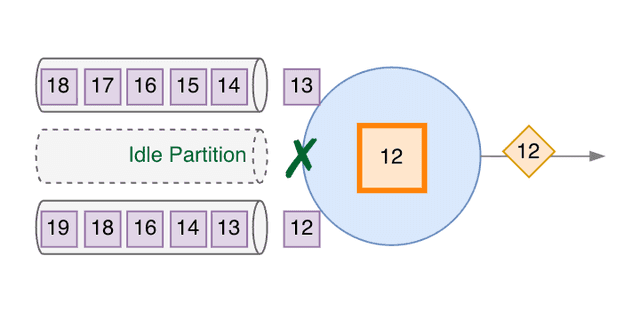
-
Now the Subtask Watermark time can progress with the Active partitions, and Watermark signals are emitted downstream.
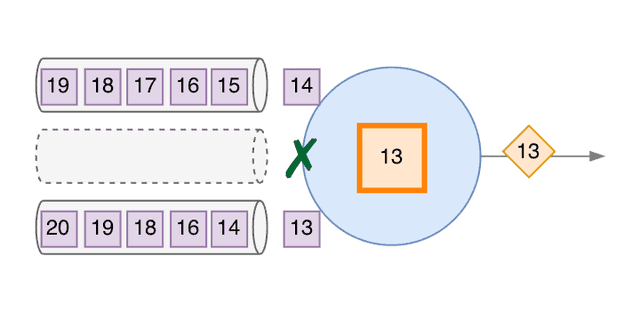
If a Kafka topic is completely idle, all the Source Subtasks reading that topic signal they are Idle. The entire Source Operator reading that topic is practically Idle and emits no Watermark.
Idle partition timeout resets when a job restarts, after autoscaling for example. This means a source emitting Watermarks before restart may temporarily stop emitting until idle partitions time out again.
Note: Idle Partition Detection relies on support of FLIP-27 by the source connector. Several connectors, beyond Kafka, support it. Confluent Cloud for Apache Flink supports an improved version, with a Progressive Idleness Detection algorithm. It's also enabled by default. We will see this in more detail in Part 2 of this blog.
Idleness Propagation - Idle Watermark Status Signals
When a Source Subtask is fully idle (all Kafka partitions it reads are idle), it emits an Idle Watermark Status signal and stops emitting Watermarks.
-
Let's go back to our Kafka Source Subtask.
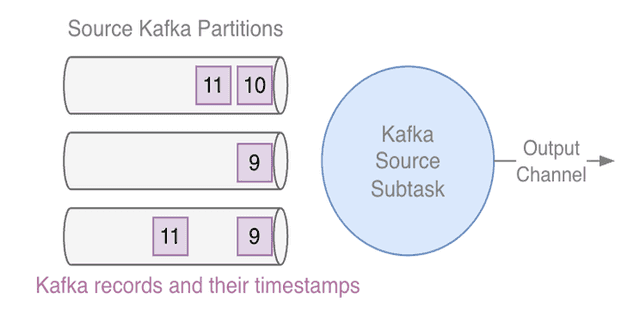
-
As long as all partitions progress, Watermark progresses, and Watermark signals are emitted. Everyone is happy.
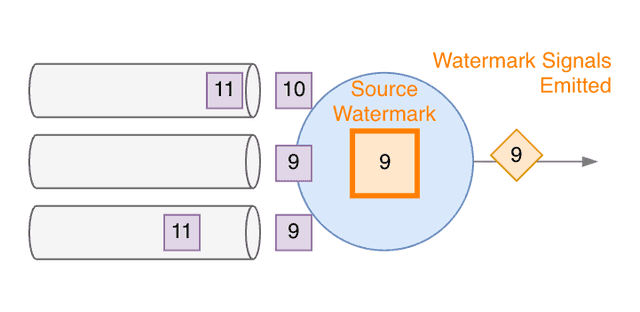
-
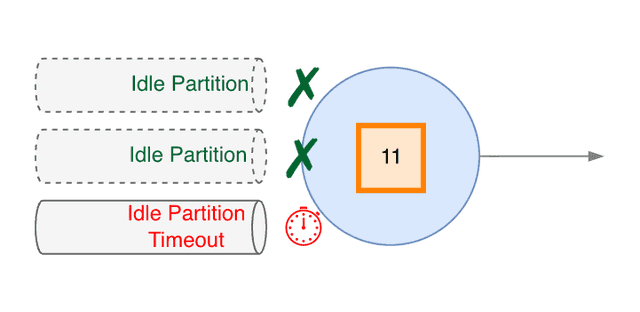
If records stop arriving on a partition, the Idle Partition Timeout timer starts counting...
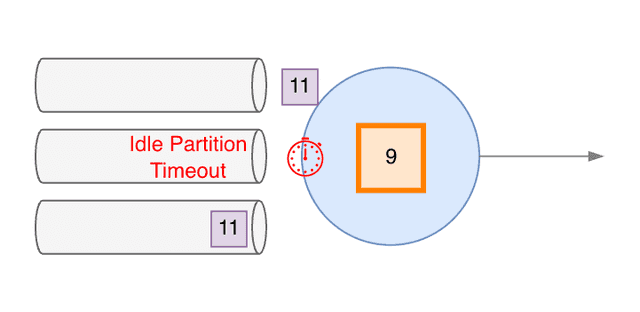
-
...and mark the partition as Idle as soon as the Timeout expires, letting the Watermark progress with the other partitions. But, if other partitions also stop receiving records...
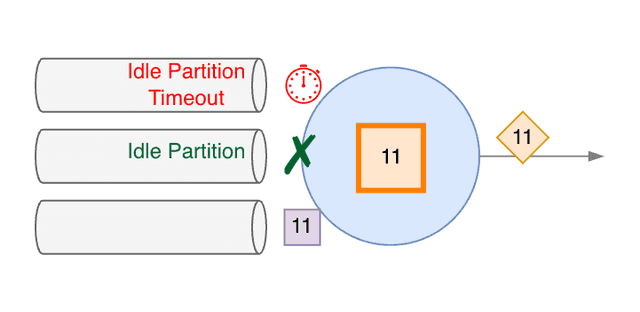
-
...they are also marked as Idle.
-
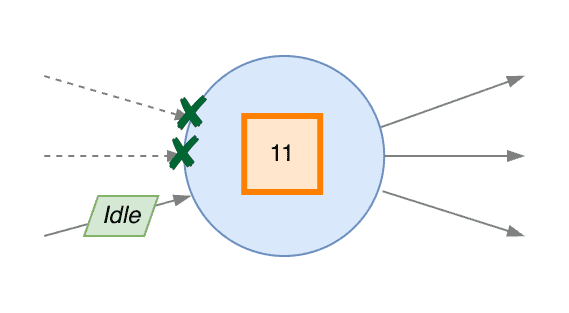
It can happen that all partitions consumed by a Subtask stop receiving records, and are progressively all marked as Idle. When this happens, the Subtask considers itself Idle (from the point of view of Watermarks) and emits an Idle signal to its output Channels, to communicate the fact downstream.
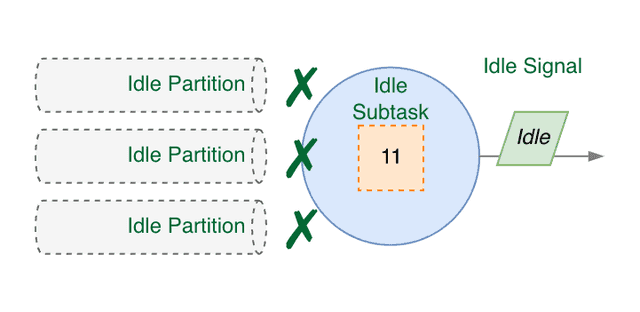
On receiving the Idle signal, downstream Subtasks mark that input Channel as Idle and ignore it for Watermark calculation.
All other (non-Source) Subtasks follow the same mechanism: if all their input Channels are marked Idle, the Subtask becomes Idle and emits an Idle signal downstream.
Thus, "idleness" propagates downstream.
-
Let's see what happens in a non-Source Subtask, with multiple input and output Channels.
-
The Subtask Watermark time progresses as the minimum (oldest) Watermark signal received from upstream. Watermark signals are emitted downstream, on all output Channels, every time the Subtask Watermark time progresses.
-
When an Idle signal is received on one of the input Channels...
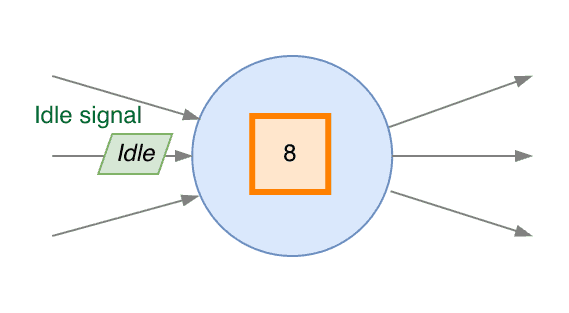
-
...the Subtask marks that input Channel as Idle and starts ignoring it, for the purpose of calculating the Watermark time. The Subtask Watermark time now progresses, only considering the Watermark signals of the other input Channels.
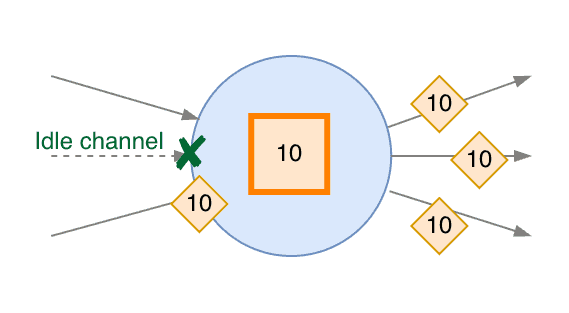
-
If an Idle signal is received on another input Channel...
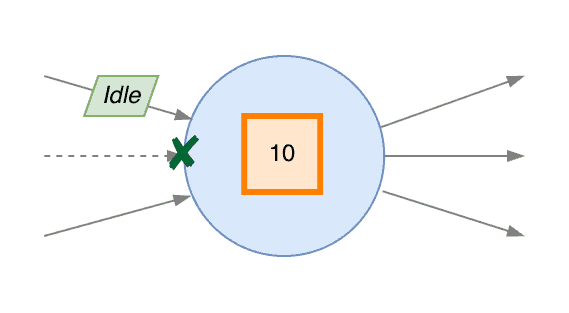
-
...that Channel is also marked as Idle and ignored for the sake of Watermark calculation. The Subtask Watermark progresses based on the remaining, Active input Channels.
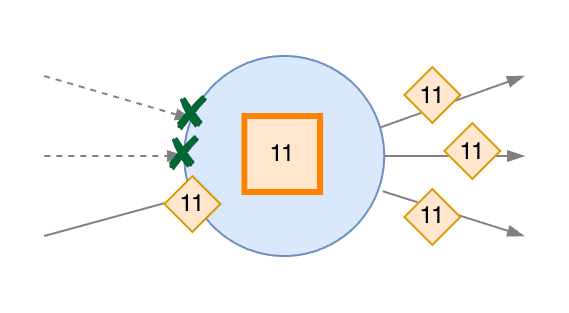
-
If, at some point, all input Channels have received Idle signals...
-
...they are all marked as Idle and the Subtask considers itself as Idle from the Watermark generation point of view. To signal this downstream it emits Idle signals to all output Channels.
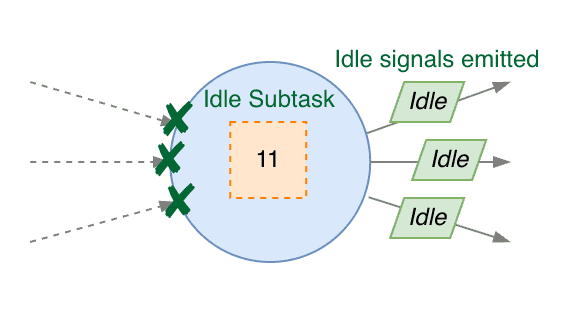
Don't let this confuse you: The "idleness" we are talking about here is related to Watermark generation. This is not related to the level of "idleness" or "busyness" of Operators and Subtasks processing records, shown by the Flink UI and reported by metrics.
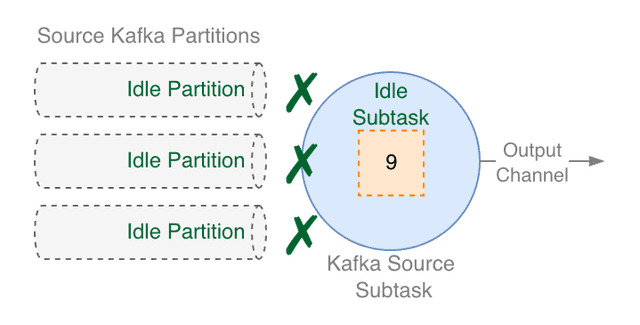
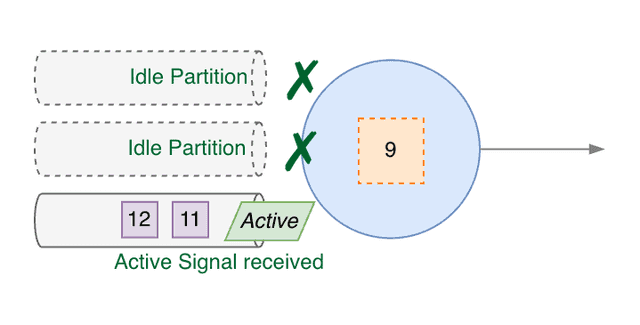
When an Idle Source Subtask receives a record on any input (Kafka) partition, it returns to "active". It emits an Active Watermark Status signal and resumes emitting Watermarks.
-
Consider a Source Subtask where all Kafka partitions have been marked as Idle. As we have seen, the Subtask considers itself Idle and has previously emitted Idle signals when it became Idle.
-
At some point, the Subtask receives some records from one of the Kafka partitions. It immediately marks it as Active.
-
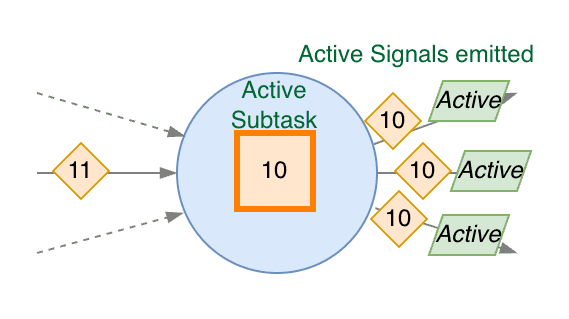
The Subtask "wakes up" as Active, emits an Active signal downstream, and restarts emitting Watermark signals.
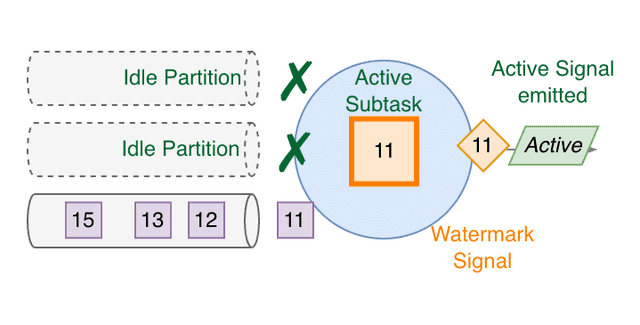
-
The Source Subtask Watermark time now progresses, based on the active partition, and emits Watermark signals downstream normally.
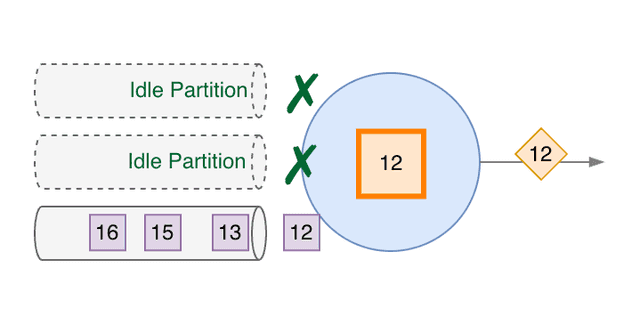
Similarly, other Subtasks switch an input partition back to active upon receiving an Active signal and resume considering that partition for Watermark calculation.
-
A (non-Source) Subtask is Idle because it has marked all input Channels as Idle before, after receiving Idle signals on all of them.
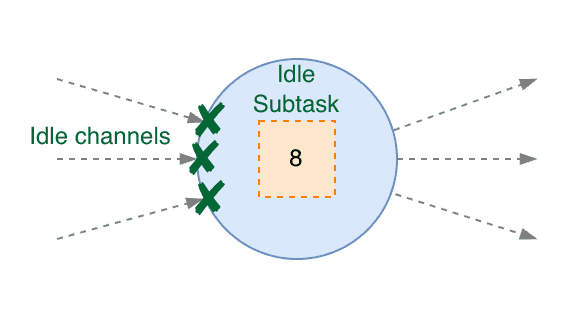
-
At some point, an upstream Subtask "wakes up" and sends an Active signal. On receiving it, our Subtask marks that Channel as Active.
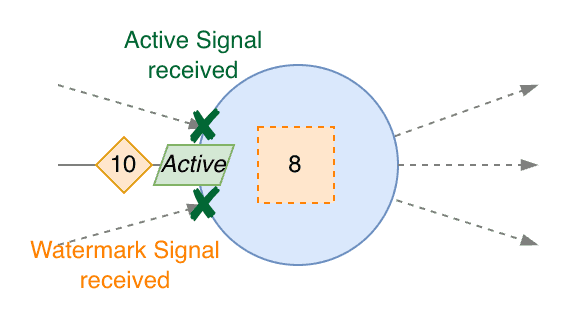
-
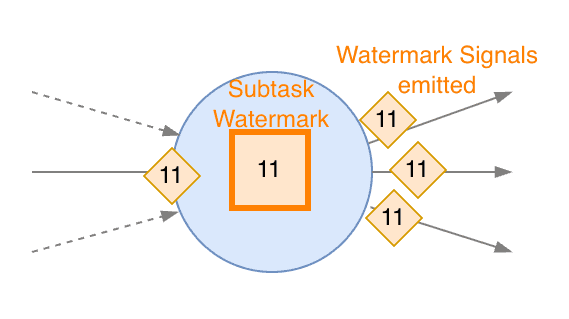
From this point on, our Subtask also "wakes up", sends Active signals to all output Channels, and restarts progressing its Watermark time and emitting Watermark signals.
-
The Subtask Watermark now progresses normally, following the input Channel which is now considered Active.
Takeaways:
- Idleness in the Sources is based on the input Kafka partitions and uses inactivity timeouts.
- Idleness in downstream Subtasks is determined by Idle and Active Watermark Status signals received on their input Channels.
Enabling Idle Partition Detection
In Apache Flink, Idle Partition Detection is disabled by default. To enable it, you can explicitly define the idle timeout with the scan.watermark.idle-timeout property:
CREATE TABLE orders (
    ...
    order_time TIMESTAMP(3),
    WATERMARK FOR order_time AS order_time - INTERVAL '5' SECOND
) WITH (
  'scan.watermark.idle-timeout' = '1min',
  ...
);
Watermark Alignment
TL;DR: The goal of Watermark Alignment is to read records from all input partitions with event-time (more or less) aligned. It achieves it by slowing down reading from partitions Flink is reading too fast compared to others.
Elaborating a bit, Watermark Alignment solves the opposite problem of idle partitions: if an input Kafka partition is much sparser than others (i.e. it has fewer records per second, aka lower throughput), Flink may read it faster than other partitions which contain more messages. In particular, this may happen when Flink is consuming a backlog of old messages (as opposed to consuming data in real-time, with a negligible lag).
Because Watermarks progress with the slowest input partition (MIN timestamp), newer messages from denser partitions may end up being read later. Watermarks progress slower than they could. Flink may have to buffer more records (in state) for time-based operations while waiting for the Watermarks.
To prevent this, Watermark Alignment slows down reading from partitions which are read too fast, in relation to the event-time.
This is how it works:
- Flink keeps track of how much the MAX observed timestamp diverges across different partitions of the same source topic.
- When a partition is ahead of others by more than a specified Maximum Allowed Drift (sometimes also called Maximum Allowed Deviation), the Source slows down reading from that partition.
Slowing down reading is counter-intuitive. It may appear to be reducing the processed throughput. However, because this reduces the number of records buffered by Flink, it eventually improves performance.
Note: Watermark Alignment also relies on support of FLIP-27 by the source connector. Confluent Cloud for Apache Flink enables Watermark Alignment by default. More details in Part 2.
Enabling Watermark Alignment
Watermark Alignment is disabled by default. To enable it, in Flink SQL, you need to specify scan.watermark.alignment.group and scan.watermark.alignment.max-drift:
CREATE TABLE orders (
    ...
    order_time TIMESTAMP(3),
    WATERMARK FOR order_time AS order_time - INTERVAL '5' SECOND
) WITH (
    'connector' = 'kafka',
    ...
    -- 1. Alignment Group Name
    'scan.watermark.alignment.group' = 'orders-alignment-group',
    -- 2. Max Drift Allowed (Pauses splits that exceed this drift)
    'scan.watermark.alignment.max-drift' = '1 min',
    -- 3. Update Interval (Optional, default is '1s')
    'scan.watermark.alignment.update-interval' = '1 s'
);
The Alignment Group name allows you to enable Watermark Alignment across multiple sources, including different connectors.
Note: Watermark Alignment can work across multiple sources. You may wonder why there is no similar mechanism for Idle Partition Detection. The reason is that it is not needed.
We have seen that a completely idle Subtask emits a signal, making downstream Subtasks ignore that input for the sake of Watermark generation. This also applies across Subtasks of different Source Operators without any other cross-operator signal.
Interaction between Watermark Alignment and Idle Partition Detection
Something important to remember is that Watermark Alignment and Idle Partition Detection may interfere with each other, if you enable both.
If Max Allowed Drift is lower than Idle Partition Timeout the Source may slow down reading other partitions while waiting for the slow partition to be marked Idle.
If you enable both, make sure Max Allowed Drift >= Idle Partition Timeout.
Watermarks vs Checkpoints
TL;DR: Watermarks and Checkpoints are not related.
This common misunderstanding probably derives from the fact that Checkpoints use special signals, Checkpoint Barriers which start from the Source Subtasks and propagate through the dataflow, similarly to Watermarks.
"Stuck" Watermarks may prevent data from being emitted, but Checkpoints may proceed regularly.
When Checkpoints get stuck, data processing does not progress. But this has nothing to do with Watermarks.
Checkpoint Barriers also propagate through Subtasks. However, the mechanism is different from Watermark propagation. Checkpoint Barriers are out of scope for this document.
Watermarks are not checkpointed
Watermarks are also not saved as part of a Checkpoint/Savepoint.
When a job restarts from a Checkpoint, Watermark Sources restart generating Watermarks and propagating them downstream the same way as when the job was started the first time.
Idleness and Alignment are also reset on restart, for example on (auto)scaling. This has an important implication: after a restart, the new Watermarks can be older than those previously generated for the same data. Watermarks may appear to have moved backward after the restart.
This may happen if Watermarks are temporarily withheld by partitions which, before the restart, were marked as Idle and ignored.
Watermarks and Lateness are Non-Deterministic
Although event-time semantics aim for determinism, Watermark generation and the classification of events as Late are not strictly deterministic. Running the same job twice on the same dataset (consuming the same offset range from the same source topics) does not guarantee identical results.
If you are used to relational databases, for example, and you are approaching Flink SQL, this is an important aspect to remember. In a relational database, running the same query twice on the same dataset always yields identical results. This is not guaranteed to happen with a Flink SQL query.
This is especially true when comparing real-time processing, where a job processes records as they arrive with minimal lag, to re-processing the same historical data later.
Why does this happen?
Indeterminism arises because some mechanisms rely on system time (wall-clock), which differs each time you reprocess the same dataset. For example, idle detection timeouts and Watermark Emission Intervals (not to be confused with the Watermark Delay Interval, aka bounded-out-of-orderness) are based on system time. Running the same job, with the same dataset twice doesn't guarantee that Watermarks will be identical.
Replaying historical data often happens at very high throughput, which can cause slightly-late events not to be considered late, and thus not discarded, by some operators — a behavior which may not happen when you process the same data live.
Additionally, events like job restarts due to autoscaling or crashes reset Watermarks, idle timeouts, and Watermark alignments. These events never occur deterministically.
Finally, Flink job Subtasks communicate asynchronously. A Subtask calculates Watermark time based on the minimum received event-time (for Sources) or Watermark (for other operators), but the order of events read from multiple partitions differs across reprocessing.
Implications of Watermarks non-Determinism: Watermark in Separate Statements vs Statement Sets
Because Watermark generation is non-deterministic, two jobs reading from the same source topic may have different Watermarks, even if they are using the same time attribute.
For example, the following statements run as separate Jobs, and nothing guarantees they both observe the same Late Events:
-- Statement 1: send late data to dead letter queue
-- THIS WILL NOT capture the same late events dropped by statement 2
INSERT INTO inflight_purchases_late_data_queue
SELECT * FROM inflight_purchases
WHERE event_time <= CURRENT_WATERMARK(event_time);

--- Statement 2: windowed aggregation
INSERT INTO inflight_purchases_hourly_cnt
--- (the Common Table Expression CTE is needed for the TUMBLE TVF syntax)
WITH on_time_purchases AS (
  SELECT * FROM inflight_purchases
  WHERE event_time > CURRENT_WATERMARK(event_time)
)
SELECT window_start, window_end, COUNT(*)
FROM TUMBLE (
  TABLE on_time_purchases,
  DESCRIPTOR(event_time),
  INTERVAL '1' HOUR
)
GROUP BY window_start, window_end;
Wrapping the same statements in a STATEMENT SET makes them a single Job, reusing the Source Operator. The two Statements become branches of one Dataflow, starting from the same Source. Since Watermarks are generated by the Source, both statements use the same Watermarks and capture the same Late Events:
EXECUTE STATEMENT SET
BEGIN

-- Send late data to dead letter queue
-- This WILL capture the late events dropped by the aggregation
INSERT INTO inflight_purchases_late_data_queue
SELECT * FROM inflight_purchases
WHERE event_time <= CURRENT_WATERMARK(event_time);

-- Windowed aggregation
INSERT INTO inflight_purchases_hourly_cnt
WITH on_time_purchases AS (
  SELECT * FROM inflight_purchases
  WHERE event_time > CURRENT_WATERMARK(event_time)
)
SELECT window_start, window_end, COUNT(*)
FROM TUMBLE (
  TABLE on_time_purchases,
  DESCRIPTOR(event_time),
  INTERVAL '1' HOUR
)
GROUP BY window_start, window_end;

END;
Batch Mode
Before closing this first post, it's worth noting that Watermarks are only used in Streaming mode. When Flink runs in Batch mode, it completely ignores the watermark definition, except for identifying the event-time attribute.
In SQL, the Table Planner uses different operator implementations, specialized for batch, that implement any event-time logic based on the event-time attribute.
Because in Batch mode Flink can see "all the data" comprising the batch, it can reorder records based on event-time and apply any logic without worrying about out-of-orderness. For this reason, there is no Late Event in Batch mode.
Conclusion
In this first part we have walked through the most relevant aspects of Apache Flink Watermarks.
We have analyzed how Watermarks are generated and how they propagate. We have seen how Idle Partition Detection and Watermark Alignment solve opposite but related problems.
We have debunked common points of confusion between Watermarks and Checkpoints, and misconceptions about determinism.
All the considerations apply to Apache Flink in general. In Part 2, we cover default behaviors and extensions introduced by Confluent Cloud for Apache Flink.